清单与筛选
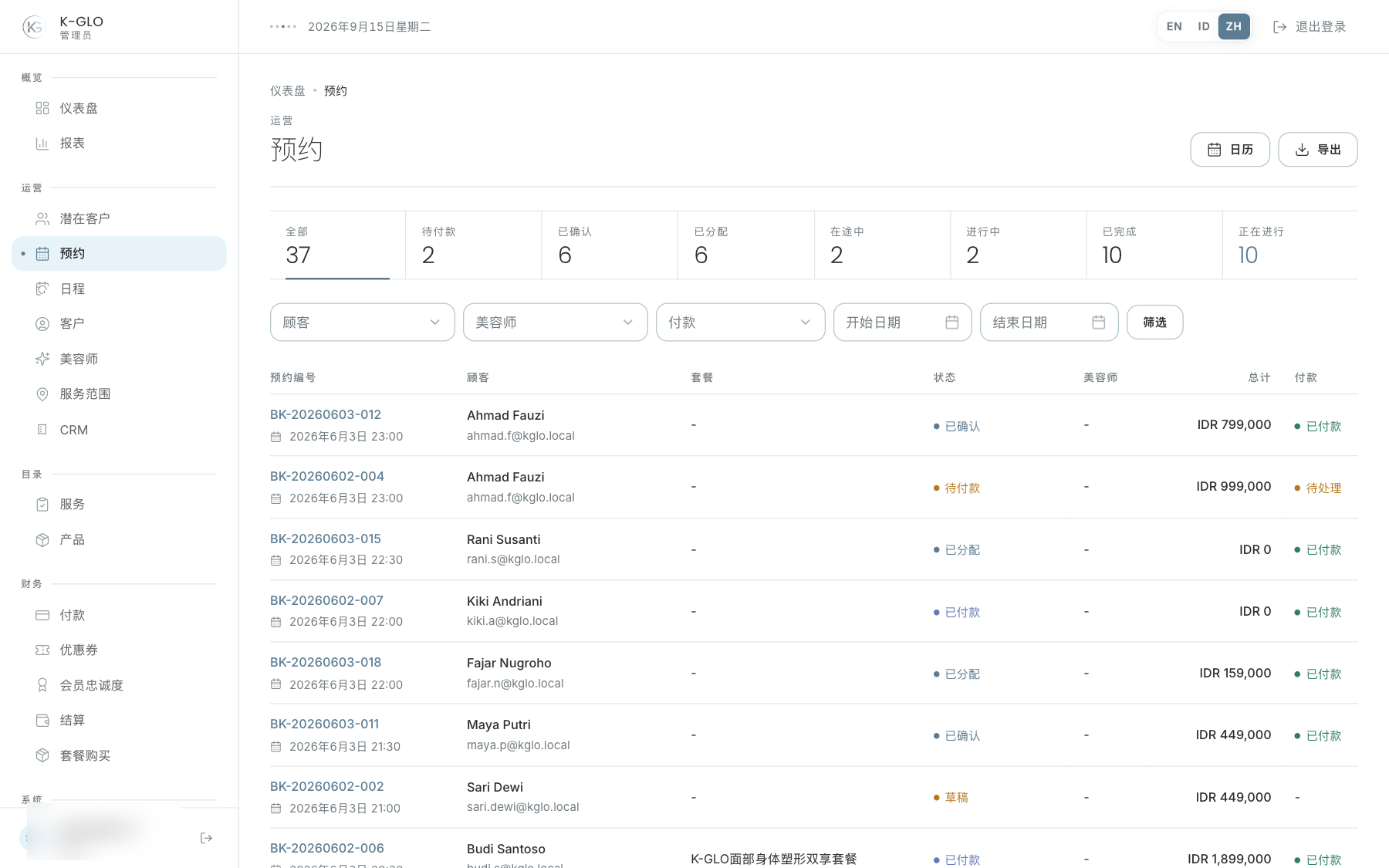
可按状态、客户、美容师、付款状态和起止日期筛选。点击 Filter 应用筛选;状态摘要是快捷筛选链接。CSV 导出使用已应用的筛选条件,页面标题栏可进入日历。
查看详情面板
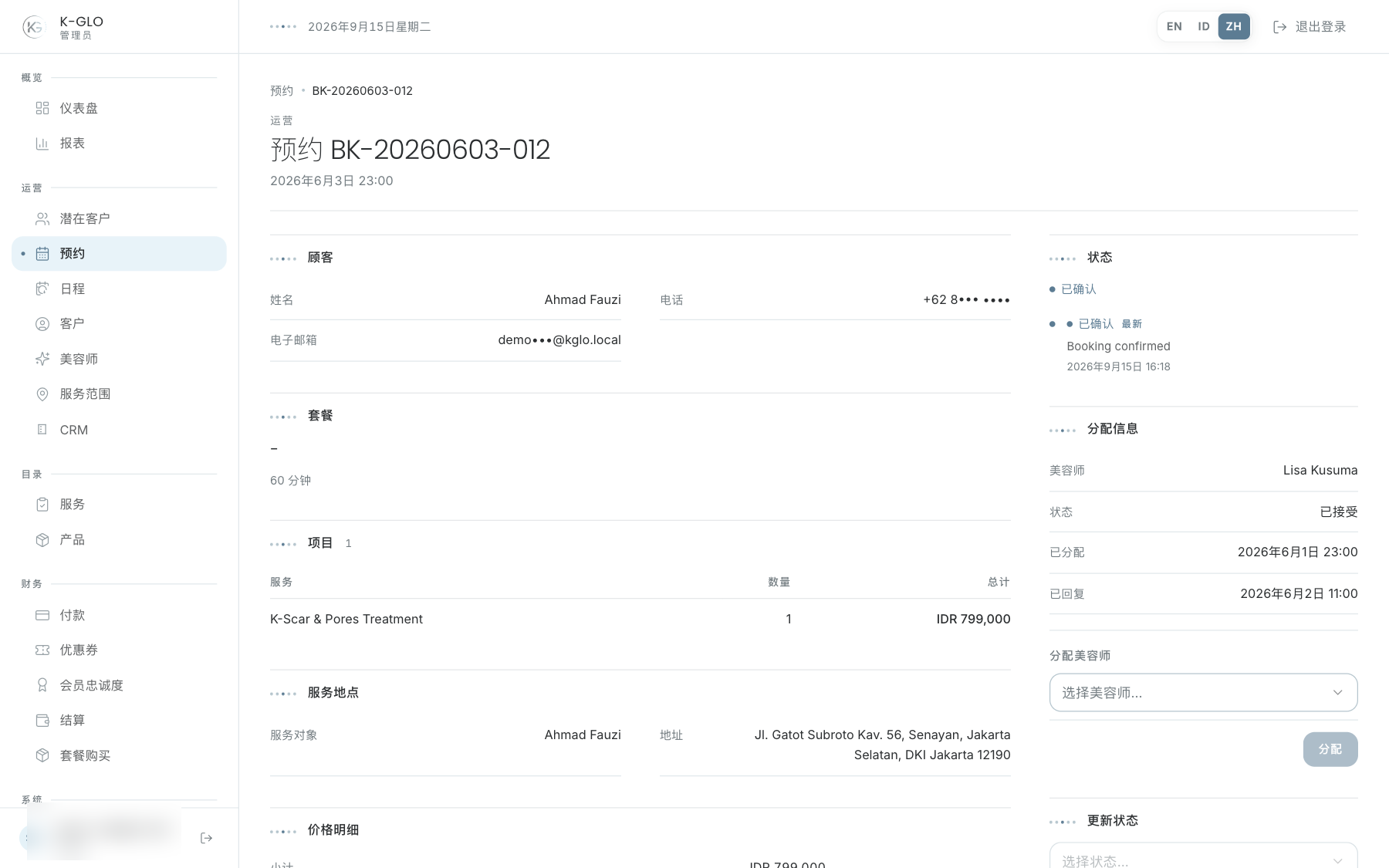
主栏展示客户、套餐、服务项目、地点、价格、支付、皮肤评估和取消备注(如有)。右侧操作栏展示状态、流程、事件历史、美容师分配、状态流转和取消操作。
创建门店现场护理预约
- 打开预约,选择新建门店预约。
- 选择顾客、门店、护理时间,并可选择首选美容师。
- 选择一个或多个护理项目并设置数量。
- 检查预计时长和总额,然后选择创建门店预约。
只有在服务中将服务地点设为仅限门店或上门与门店的护理项目才会显示。预约创建后状态为待付款,并生成一笔不会自动过期的 EDC 终端付款。
提交 EDC 付款
EDC 终端批准刷卡后,打开预约详情,在提交 EDC 付款面板中输入小票编号或终端授权编号。系统会将该编号保存为付款凭证、把付款标记为已支付,并确认预约。没有 EDC 凭证时,不能通过通用状态控件直接选择已支付。
门店预约表单
public/screenshots/zh/salon-booking-create.png提交 EDC 付款
public/screenshots/zh/salon-edc-payment.png分配美容师
- 检查地点、服务、日程和状态。
- 在分配表单中选择美容师。
- 保存,并确认详情页中的美容师姓名已更新。
更改状态
- 阅读当前状态和事件历史。
- 选择可用的状态流转。
- 阅读确认对话框。
- 仅在与现场情况一致时确认。
对于状态为已分配且美容师已接受的预约,管理员可以选择美容师在途中。系统会记录出发时间,并以美容师服务区域中心到预约地址为起点和终点计算一次预计到达时间;此操作不会启用实时位置追踪。
破坏性状态或终止状态可能锁定后续流转。
取消预约
使用右侧操作栏中的取消表单,并填写至少两个字符的原因。系统会显示确认对话框;取消确认后预约保持原状态。确认后,原因会显示在预约详情和历史记录中。
操作演示视频
视频使用隔离演示数据录制英文管理后台,并放慢播放以便跟随操作。敏感值已遮蔽。未执行外部付款或服务商发送。
录制日期:
admin creates, settles by EDC receipt, and assigns a salon booking 0:16
已覆盖步骤(英文)
- Create a salon booking by selecting a consumer, clinic, schedule, preferred beautician, service, quantity, and notes.
- Verify the booking starts pending payment and Paid is unavailable through the generic status selector.
- Submit an invalid short EDC reference and verify the booking remains unpaid, then submit a valid EDC receipt reference and verify payment is paid and booking is confirmed.
- Assign a beautician and verify the assignment and assigned booking status.
admin updates an assigned booking status through the permitted transition 0:07
已覆盖步骤(英文)
- Open an accepted assigned booking, select Beautician En Route, confirm the transition, and verify the updated status.
admin cancels an active booking with a reason 0:07
已覆盖步骤(英文)
- Enter a cancellation reason, dismiss the confirmation and verify the booking remains confirmed, then confirm cancellation and verify the cancelled status and retained reason.
admin filters confirmed bookings and exports the filtered booking dataset 0:07
已覆盖步骤(英文)
- Open confirmed bookings, verify a seeded booking, and download the filtered CSV export.
admin applies booking consumer, beautician, payment, and date filters from the ledger 0:10
已覆盖步骤(英文)
- Select a consumer, beautician, paid payment status, and start/end dates on the ledger; apply the filters and verify the corresponding query parameters.
admin switches calendar views and filters by booking status 0:05
已覆盖步骤(英文)
- Switch calendar to Week and Day views and filter calendar bookings by status.
admin navigates schedule periods and preserves status and beautician filters across calendar views 0:11
已覆盖步骤(英文)
- Navigate to next period and Today, filter by booking status and beautician, switch between Week/Day/Month while retaining filters, navigate to the previous period, and open a booking from its calendar entry.